Top 10 Names That Always Get Autocorrected Wrong (And the Chaos That Follows)
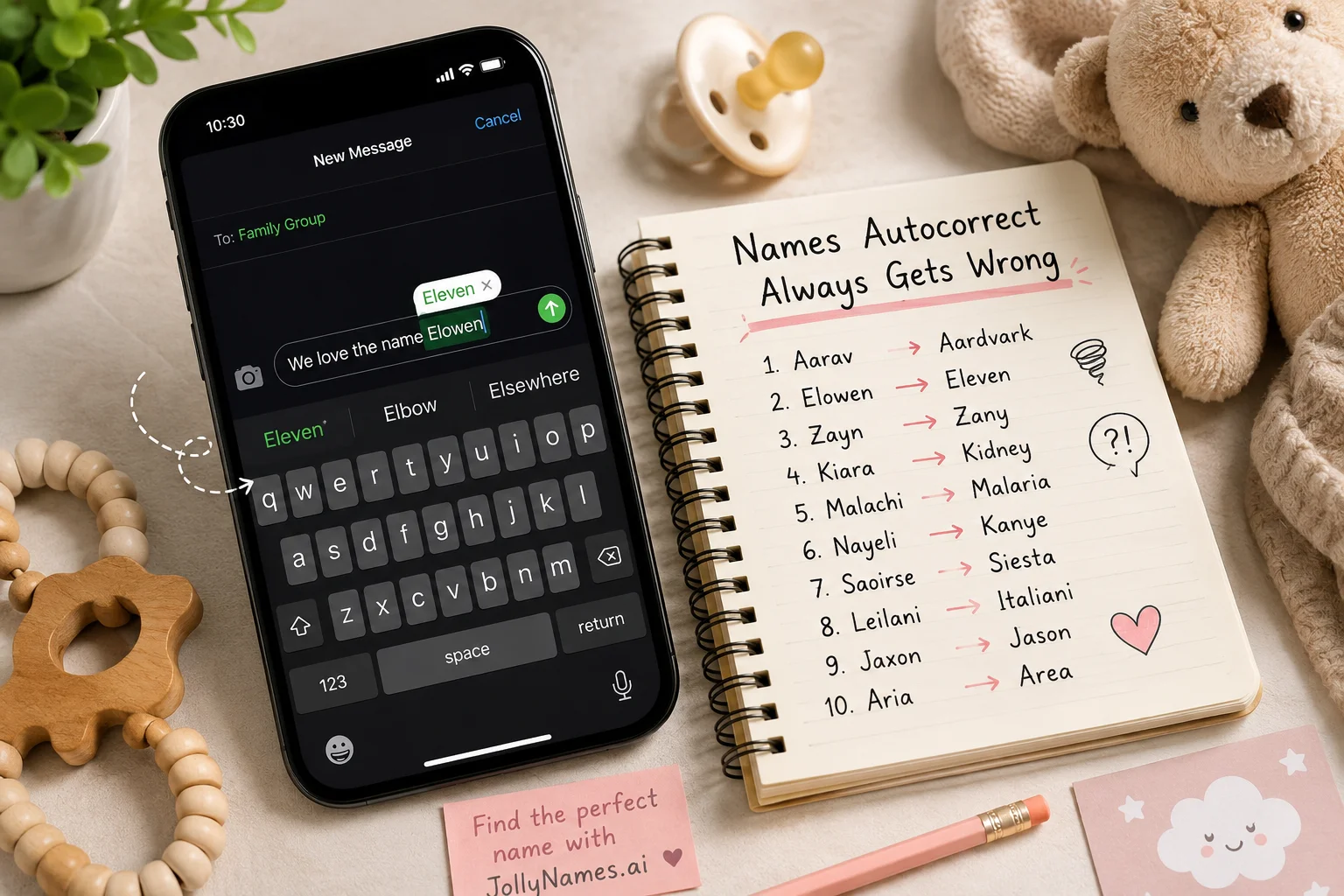
Autocorrect mangles names it doesn't recognize — mostly short, invented, or non-English-rooted names like Aarav, Elowen, Zayn, and Malachi — because they aren't in the phone's default dictionary. The software swaps the name for the nearest "real" word it knows, which is how a sweet birthday text turns into nonsense. The fix: add the name to your phone's personal dictionary, or search it through a Name Predictor and Name Generator tool like JollyNames before you commit, so you know exactly how the name behaves in the real, autocorrect-filled world.
Every parent-to-be has a moment of panic somewhere between picking a name and texting it to the group chat: their phone quietly rewrites it into something unrecognizable. It happens to grandparents typing a new grandchild's name for the first time, to friends congratulating new parents, and to the parents themselves, mid-announcement, wondering why autocorrect just turned "Elowen" into "Eleven." This isn't bad luck — it's predictable, it's common, and once you understand why it happens, you can search for a name that won't trigger it in the first place.
Why Do Certain Names Confuse Autocorrect?
Autocorrect works off a dictionary of common words and a probability model of what you "probably" meant to type. Names are a problem for that model because most names aren't in the base dictionary at all — especially newer, blended, or culturally specific names. When the software doesn't recognize a word, it looks for the closest match by keyboard distance and letter pattern, then quietly substitutes it. The more unusual or invented the name, the more confidently wrong the substitution tends to be.
This matters for more than just funny screenshots. If the names you're considering are hard for a keyboard to recognize, they can also be harder to search for online, harder to spell over the phone, and easier to misspell on official documents. That's exactly why a growing number of parents run a shortlist of names through a search or a Name Predictor before making a final decision.
A Short History of Why Your Phone Is So Confidently Wrong
Predictive text didn't start out trying to guess names at all. Early spellcheckers were built for formal documents, loaded with dictionaries of standard vocabulary and almost nothing else. When smartphones adopted the same underlying logic for on-the-fly typing, they inherited the same blind spot: anything outside "common word" territory, including most proper names, got treated as a typo to be fixed rather than a word to be learned.
Modern keyboards have gotten smarter — they now learn from your personal typing history and can pick up frequently used names over time. But that learning only kicks in after you've typed the name enough times, which means the first weeks after choosing a name are almost always the messiest. Grandparents, babysitters, and coworkers who haven't "trained" their own phones yet are the ones who end up sending the most chaotic texts, simply because their keyboard has never seen the name before.
The Top 10 Names That Always Get Autocorrected Wrong
Here are ten names that consistently trip up autocorrect, based on patterns seen across texting fail communities, keyboard-proximity logic, and how modern naming trends collide with outdated phone dictionaries — plus the chaos that tends to follow each one.
1. Aarav
Phones without South Asian names pre-loaded often flatten the double "a" and turn Aarav into "Aardvark" or "Aarav" gets clipped to "Arav" mid-sentence. One parent reported inviting family to "Aardvark's first birthday party" and getting genuinely confused RSVPs. The fix is simple but easy to forget: the very first time you type the name on a new phone, spell it slowly, tap the suggestion bar to reject the substitute, and most keyboards will remember your correction for next time.
2. Elowen
This Cornish name for "elm tree" regularly becomes "Eleven" or "Elbow." A grandmother once texted the whole family that "Elbow said her first word," which is either adorable or slightly concerning depending on how you read it. Because Elowen shares so many letters with common English words, it's a good example of a name that looks classic on paper but behaves unpredictably the moment it hits a keyboard.
3. Zayn
Short vowel-heavy names are magnets for keyboard-proximity swaps. Zayn frequently becomes "Zany" or "Zain," turning a calm bedtime update like "Zayn is finally asleep" into "Zany is finally asleep" — which, to be fair, is sometimes also accurate. Short names are actually more vulnerable than long ones, since a single letter swap is enough to land on a completely different, fully valid word.
4. Kiara
Autocorrect loves a brand name, and Kiara often gets swapped for "Tiara" or the car brand "Kia." A new dad's proud announcement, "Kiara is home from the hospital," once arrived as "Kia is home from the hospital," prompting a friend to ask if he'd bought a car. Names that overlap with well-known brands or products are especially prone to this, since the dictionary weights those words as far more "likely" than a personal name.
5. Xander
The leading X trips up most predictive keyboards, which default to more familiar words. Xander is a repeat offender for becoming "Wander" — so "Xander won't stop crying" turns into the far more philosophical "Wander won't stop crying." Names starting with X, Q, or Z tend to have the smallest pool of "nearby" dictionary words for the software to fall back on, so the substitutions it does make are often wildly off-topic.
6. Priya
This popular name frequently autocorrects to "Pray" or "Priya" gets shortened to "Pria." One relative's well-meaning text, "Priya is walking now," became "Pray is walking now," which understandably alarmed a very devout aunt. Interestingly, Priya is popular enough globally that many regional keyboard packs now recognize it correctly — a reminder that where you're typing from can matter as much as what you're typing.
7. Malachi
Longer, biblically rooted but less common names like Malachi frequently split apart. Phones tend to suggest "Malachite" (the mineral), turning a nursery announcement into something that sounds like a geology report. Multi-syllable names are more likely to get "completed" into a longer dictionary word rather than swapped for a shorter one, which is why they tend to produce the strangest, most technical-sounding substitutions.
8. Nova
Nova collides directly with the common word "Nova" used for cars and stars, so it usually survives — but paired with certain other words it gets autocorrected to "Novak," surprising more than one parent mid-text about tennis. This is a useful case study: a name can be perfectly spelled and still get pulled sideways depending on the words sitting next to it in the sentence, since predictive text considers context, not just the single word you typed.
9. Rhea
The silent H throws most keyboards off, and Rhea regularly becomes "Rhea" auto-swapped to "Area" or "Rhea" to "Ryan." "Rhea's crying again" has, more than once, arrived as "Area's crying again," which reads like a horror movie logline. Names with silent or unusual letter combinations are consistently the hardest for autocorrect to leave alone, because the software has no reliable pattern to match them against.
10. Kai
Short and simple should be safe, but Kai regularly gets swapped for "Kaiju" (the Japanese term for giant movie monsters) on phones with anime-heavy predictive text, or flattened into "Kail." "Kai took his first steps" has occasionally become "Kaiju took his first steps," which is objectively a better headline. It's proof that even short, popular, easy-to-spell names aren't automatically autocorrect-proof — the dictionary loaded on the sender's specific phone matters just as much as the name itself.
It's Not Just Baby Names — Pet Names Get the Same Treatment
The autocorrect problem isn't limited to nurseries. Pet parents run into identical chaos the moment they name a new puppy or kitten something distinctive. A dog named "Biscoe" becomes "Bisque" in every vet appointment reminder. A cat named "Wisp" turns into "Wisp" auto-swapped to "Wasp," which makes for an alarming subject line on an adoption update email. Because JollyNames covers both baby and pet naming, the same search-and-test approach applies either way: before you commit to a spelling, see how it behaves on a real keyboard, not just on paper.
Real-World Chaos Beyond the Group Chat
Texting fails get the laughs, but the same substitution problem shows up in higher-stakes places too. Autofill on online forms has been known to "correct" an unusual name into a completely different word, causing shipping labels, event name tags, and even email greetings to arrive wrong. Voice-to-text adds another layer of chaos, since it has to guess the spelling of a name it's never seen purely from sound — which is how a voicemail meant to say "call me about Elowen's appointment" can transcribe as something unrecognizable. None of this means you should avoid a name you love; it just means it's worth knowing in advance how that name is likely to travel across different apps, keyboards, and voice assistants.
How to Search for a Name Autocorrect Won't Butcher
Before you fall in love with a spelling, it helps to search how a name actually behaves outside of a baby-name book. A few practical steps:
● Type the name into your own phone's messages app and send yourself a test text — see what it becomes before you announce it to family.
● Search the name alongside common nicknames and spelling variants to see which version is easiest to type and find online.
● Add the final spelling to your phone's personal dictionary the moment you decide on it, so it stops fighting you.
● Check pronunciation and spelling consistency — names that are phonetic in more than one language tend to autocorrect less often.
Skip the Guesswork: Try a Name Predictor Before You Choose
This is exactly the gap JollyNames was built to close. Instead of discovering autocorrect chaos after the birth announcement has already gone out, you can run a shortlist through our Name Predictor to see how each option performs — from popularity trends to how "search-friendly" and keyboard-friendly it is. A good Predictor doesn't just tell you if a name is popular; it tells you if it's going to survive daily use without turning into an inside joke.
Free Baby Name Generator vs. Guessing Blind
If you're starting from scratch rather than narrowing down a shortlist, a Generator does the early heavy lifting. JollyNames' free Name Generator lets you filter by origin, meaning, sound, and sibling-name compatibility, then instantly shows you names that are distinctive without being unrecognizable to a keyboard. It's the difference between hoping a name works and actually testing it first.
Frequently Asked Questions About Autocorrect and Baby Names
Why does autocorrect change unique names?
Autocorrect relies on a built-in dictionary of common words. Names that are new, rare, blended, or drawn from languages the dictionary wasn't trained on aren't recognized, so the software substitutes the closest word it does know.
How can I stop autocorrect from changing a name?
Add the name to your phone's personal or custom dictionary in your keyboard settings. Most phones let you do this in seconds, and it permanently stops the substitution for that spelling.
What is a Name Predictor?
A Name Predictor is a tool that analyzes a name's popularity trends, pronunciation, and real-world usability — including how search-friendly and typing-friendly it is — before parents commit to it.
Are unusual names harder to search online?
Sometimes. Invented or heavily stylized spellings can be harder to search accurately, which is why testing a name's searchability early, alongside its autocorrect behavior, is worth doing before it becomes permanent.
Does autocorrect behave the same on every phone?
No. Dictionaries vary by device, operating system, region, and even by the apps you use most, since predictive text partly learns from your personal typing history. A name that autocorrects smoothly on one phone can still get mangled on a grandparent's older device or a different keyboard app entirely, which is why testing across a few devices — not just your own — gives a more accurate picture.
Should autocorrect chaos affect which name I choose?
Not on its own — a name's meaning and sound should always come first. But when you're genuinely torn between two spellings or two similar names, checking which one plays more nicely with a search bar, a keyboard, and a voice assistant can be a reasonable tiebreaker, especially since you'll be typing and searching that name for the rest of your life.
Autocorrect chaos is funny in hindsight but avoidable in advance. Whether you're drawn to Aarav, Elowen, Zayn, or something entirely your own, running it through a search, a Name Predictor, and a Name Generator first means the only surprise left is how much you love it — not what your phone turns it into. Start your shortlist on JollyNames, search each option the way real family and friends will eventually type it, and send your announcement knowing exactly what's going to show up on the other end.